
Distributed systems · latency · performance · reliability
Understanding p99 latency
What p99 latency means, why averages hide slow requests, and how teams measure and reduce tail latency, explained from the basics up.
 By Azhar ·
 Why your “average” is lying to you
Imagine you run a coffee shop. You tell your boss that the average customer waits 2 minutes for their coffee. Sounds great. But one customer in every hundred waits 15 minutes because the milk ran out, the machine jammed, or a giant group order landed just before them. That customer does not care about your average. They tweet about it.
Software works the same way. When engineers talk about p99, they mean that unlucky customer: the slow experience a small but real slice of users gets every day. At large companies, p99 often decides whether a release ships, whether an engineer gets paged at 3 a.m., and whether a contract with a customer is honored.
The basics: latency and distributions
Latency is how long a request takes, from the moment it is sent until the answer comes back. It is usually measured in milliseconds (ms), where 1,000 ms is one second. Under 100 ms feels instant to a person; over a second feels slow.
Latency is not one number. Send the same request 1,000 times, and you get 1,000 slightly different timings. Most cluster around a typical value; a few are much slower. Plot them, and you see a hump of normal requests and a thin, long tail stretching to the right, like a bus route that usually takes 20 minutes but sometimes takes 60.
Percentiles: p50, p90, p99
A percentile tells you what value X% of requests are at or below. The “p” in p99 just stands for percentile.
- p50 (the median): the typical request. Half are faster, half are slower.
- p90 and p95: 1 in 10 and 1 in 20 requests are slower.
- p99: only 1 in 100 requests is slower.
- p99.9: only 1 in 1,000 is slower.
So “our p99 is 300 ms” means 99 of every 100 requests finish within 300 ms.
A worked example with 10 requests
Ten requests take these times, sorted from fastest to slowest, in ms:
11, 12, 12, 13, 14, 14, 15, 16, 18, 250
| Measure | Value |
|---|---|
| Average | 37.5 ms |
| p50 (the middle value) | 14 ms |
| p90 (the 9th of 10) | 18 ms |
| p99 (with only 10 samples, the slowest) | 250 ms |
Not one request took 37.5 ms. Nine users waited 18 ms or less, and one waited 250 ms. The average describes nobody; the percentiles describe both groups. With only 10 samples, p99 is just the worst request, so you need thousands of samples before p99 becomes stable.
Why p99 matters more than you think
“Only 1% are slow” sounds harmless, but three things make it matter:
- Scale: at 10,000 requests per second, 1% is 100 slow requests every second.
- Many requests per user: one page load can trigger dozens of requests, so almost every user meets the p99 during a session.
- Fan-out: if a page waits on 100 backend calls, each with a 1% chance of being slow, about 63% of page loads hit at least one slow call.
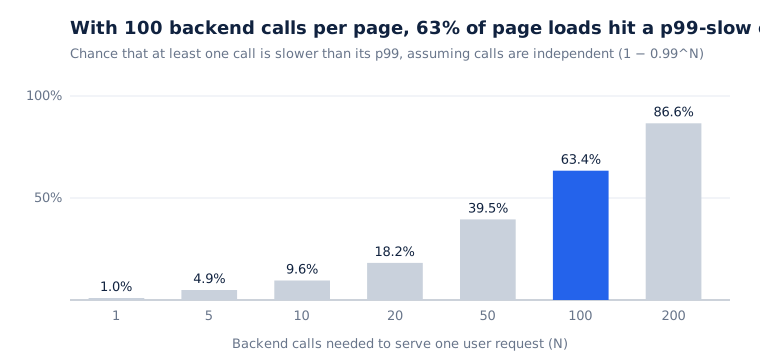
In other words, the backend’s p99 becomes the user’s typical experience. The users in the tail are also often your heaviest and most valuable customers, with the biggest carts and the most data.
Measuring p99 correctly
In theory you sort every timing and pick the one 99% of the way up. At scale, systems use histograms (counters for ranges such as 0 to 10 ms and 10 to 25 ms) or sketches such as HDR Histogram, t-digest and DDSketch, which estimate percentiles cheaply. Watch for two traps:
- You cannot average percentiles. The p99 of two servers is not the average of their p99s, and sixty one-minute p99s do not average into an hourly p99. Merge the underlying histograms, then compute the percentile once.
- Where you measure matters. Timing taken inside the server misses network and queueing time. Measure as close to the user as you can.
What makes the tail slow
Fast and slow requests usually run the same code. What differs is what was happening at that moment:
- Garbage collection pauses freeze the program while it cleans up memory.
- Queueing: a busy server makes new requests wait in line.
- Cold caches: the first request for some data has to fetch it from disk or a database.
- Noisy neighbours, background jobs and network hiccups steal resources or drop packets at random moments.
- Heavy users: a customer with 10,000 orders makes “list my orders” far slower than one with 3.
- Retries and slow dependencies: every service you wait on adds its own tail to yours.
Advanced ideas
Busy servers have terrible tails
Queueing theory shows that waiting time grows explosively as a server gets busy. In the simplest model, going from 50% to 90% busy makes responses about five times slower:
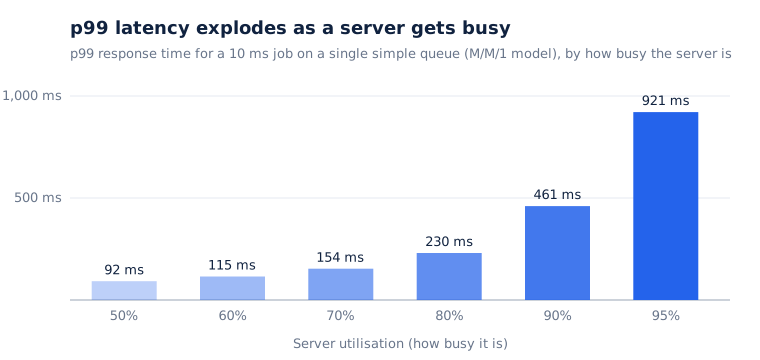
This is why teams keep servers at around 50 to 70% utilisation, leaving headroom for bursts.
Coordinated omission
Many load-testing tools wait for each reply before sending the next request. If the server freezes for 2 seconds, the tool records one slow request, while real users would have sent 200 requests and all of them would have waited. The reported p99 then looks far better than reality. Use tools that send on a fixed schedule, such as wrk2, and time each request from when it should have been sent.
The tail at scale
In “The Tail at Scale” (2013), Google’s Jeff Dean and Luiz André Barroso argued that you cannot remove every source of slowness in a large system. Instead, you design the system to stay fast even when some of its parts are slow.
How to bring p99 down
- Find the slow requests with distributed tracing and look for what they have in common.
- Leave headroom so servers do not run hot.
- Warm up caches and connection pools before taking traffic, and reuse connections.
- Set timeouts on every call, based on that dependency’s own p99.
- Retry carefully, with backoff and a cap on extra traffic, to avoid retry storms.
- Hedge requests: if a reply is slow, send a backup request to another replica and use whichever answers first.
- Shed load when overloaded, because a fast “try again” beats a slow timeout.
- Reduce fan-out and run independent calls in parallel.
Using p99 in targets and alerts
Teams turn p99 into a Service Level Objective (SLO), such as “99% of checkout requests complete in under 400 ms over 28 days”. The 1% allowed to be slower is the error budget: while it lasts, teams ship features, and when it runs out they focus on reliability. Alert when the budget is burning fast, require a minimum number of requests before trusting a p99, and chart p50, p99 and p99.9 together so you can see whether the whole distribution moved or only the tail.
Key takeaways
- Latency is a distribution, not a single number.
- p99 means 1 in 100 requests is slower than this value, and at scale that is a lot of people.
- Averages hide the tail, and fan-out makes it everyone’s problem.
- Measure with enough samples, and never average percentiles.
- Busy servers have bad tails, so leave headroom and design for slowness with timeouts, careful retries and hedging.
Further reading
- Jeffrey Dean and Luiz André Barroso, “The Tail at Scale”, Communications of the ACM, 2013
- Gil Tene, “How NOT to Measure Latency” (conference talk on coordinated omission)
- Google, “Site Reliability Engineering” and “The Site Reliability Workbook”, chapters on SLOs and alerting