
Software engineering · java · collections · data-structures · performance
Understanding Java Collections
What the Java Collections Framework is, how List, Set, Map and Queue work under the hood, and how to choose the right one, explained from the basics up.
 By Azhar ·
 Why the right container matters
Imagine a librarian who keeps every book in one big pile. Finding Dune means digging through all of them, one by one. Another librarian shelves books by author and keeps a card index. Both libraries hold exactly the same books, but one answers “do we have Dune?” in seconds and the other takes all afternoon.
Software works the same way. A collection is a container for a group of objects, and how it organises them decides which questions it can answer quickly. Pick the wrong one and code that worked fine with 100 items crawls with 100,000. The good news is that Java gives you a small, well-designed set of collections, and a few ideas are enough to choose well almost every time.
The basics: what a collection is
Java’s Collections Framework lives in the java.util package. It is built from two layers:
- Interfaces describe what a collection can do, such as “add an item” or “look up a key”.
- Implementations describe how it does it, such as “store items in an array” or “store them in a tree”.
You declare variables using the interface and choose the implementation when you create the object:
List<String> names = new ArrayList<>();      // what: a List, how: an array
Map<String, Integer> ages = new HashMap<>(); // what: a Map, how: a hash table
Because the rest of your code only knows it has a List, you can later swap ArrayList for another implementation by changing one line.
The four families
| Interface | What it holds | Everyday analogy |
|---|---|---|
List |
An ordered sequence; duplicates allowed | A playlist |
Set |
Unique items; no duplicates | A party guest list |
Queue / Deque |
Items waiting their turn | A ticket line |
Map |
Keys that point to values | A phone book |
List, Set and Queue all extend the Collection interface. Map is part of the framework too, but it stores pairs rather than single items, so it has its own interface.
Measuring speed: Big-O
To compare collections, engineers describe how the work grows as the collection grows, using Big-O notation:
- O(1), constant: the same effort whether you hold 10 items or 10 million. Like opening a book at a bookmark.
- O(log n), logarithmic: the effort grows very slowly. Doubling the items adds just one more step, like looking up a word in a dictionary by repeatedly splitting it in half.
- O(n), linear: the effort grows with the size. Checking a million items can take a million steps, like reading every page to find one sentence.
A worked example: removing duplicates
You have 100,000 email addresses and want to drop the duplicates. Here are two ways to do it:
// Version 1: check a List before adding
List<String> unique = new ArrayList<>();
for (String email : emails) {
    if (!unique.contains(email)) unique.add(email); // contains() scans the list
}

// Version 2: let a Set do the work
Set<String> unique = new HashSet<>(emails);
| Version | Cost of one check | Total work for 100,000 emails |
|---|---|---|
List.contains |
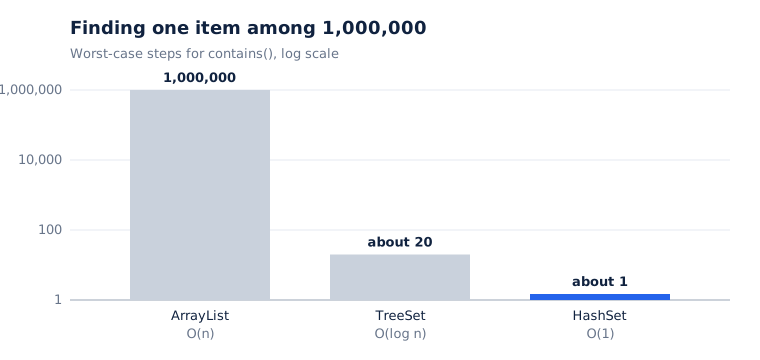
O(n): scan every item so far | About 5 billion comparisons |
HashSet |
O(1): jump straight to the item | About 100,000 lookups |
Both versions give the same answer, but the first does roughly 50,000 times more work. On a laptop, that is the difference between a few milliseconds and many seconds. Nothing about the data changed; only the container did.
Lists: ArrayList and LinkedList
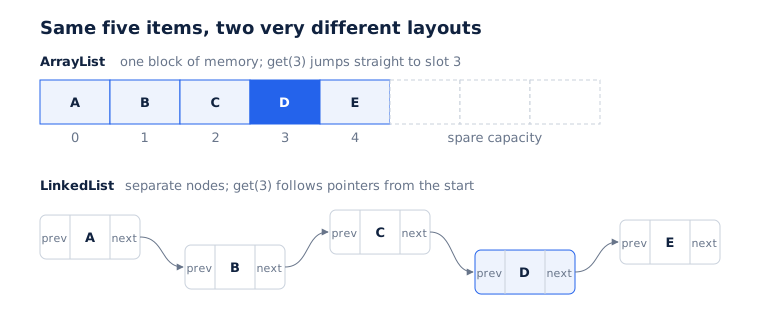
ArrayList keeps its items in a plain array, side by side in memory. Reading item number 5,000 is O(1), because Java can calculate exactly where it is. When the array is full, ArrayList creates a bigger one (about 1.5 times the size) and copies everything across. Adding at the end is still fast on average, but inserting at the front means shifting every other item along by one.
LinkedList keeps each item in its own small object, a node, that points to the previous and next nodes, like a treasure hunt where each clue tells you where the next one is. Inserting beside a node you already hold is cheap, but reaching item 5,000 means following 5,000 pointers.
| Operation | ArrayList |
LinkedList |
|---|---|---|
Read by position, get(i) |
O(1) | O(n) |
| Add at the end | O(1) on average | O(1) |
| Insert or remove in the middle | O(n) | O(n) to find the spot, then O(1) |
| Memory per item | Low | High |
Use ArrayList by default. The “Advanced ideas” section below explains why it usually beats LinkedList even where the table suggests otherwise.
Sets and Maps: how hashing works
A HashSet is really a HashMap that only uses the keys, so once you understand HashMap, you understand both.
A HashMap keeps an array of slots called buckets. To store a key, Java:
- Calls
key.hashCode(), which turns the key into a number. - Uses that number to pick a bucket.
- Stores the key and its value in that bucket.
To look the key up later, Java repeats steps 1 and 2, goes straight to the bucket, and uses equals() to find the exact match. No scanning is needed, which is why lookups are O(1) on average.
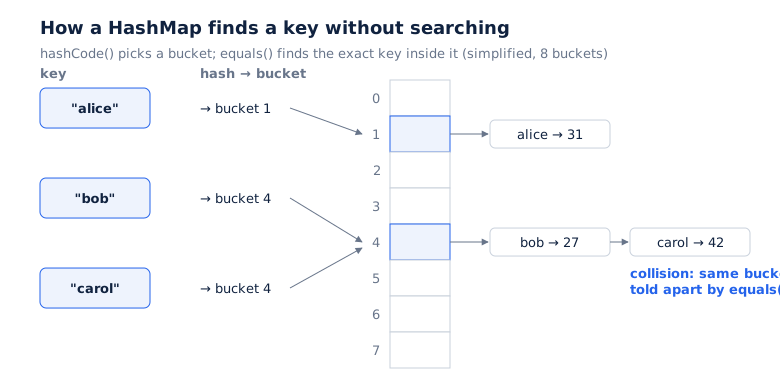
When two different keys land in the same bucket, that is a collision. Java keeps both entries in the bucket and tells them apart with equals(). A few collisions are normal; the “Advanced ideas” section covers what happens when there are many.
When order matters
A HashMap promises nothing about the order you get items back in. When order matters, pick a relative:
| Type | Iteration order | Lookup |
|---|---|---|
HashMap / HashSet |
No guaranteed order | O(1) |
LinkedHashMap / LinkedHashSet |
The order items were inserted | O(1) |
TreeMap / TreeSet |
Sorted by key | O(log n) |
A TreeMap keeps its keys in a balanced tree, so it can also answer range questions such as “the first key after 100” (ceilingKey) or “every key between A and F” (subMap).
Queues and Deques
ArrayDequeis a resizable array that is fast to add to and remove from at both ends. Use it as a stack (pushandpop) or a first-in, first-out queue (offerandpoll). It replaces the oldStackclass.PriorityQueuealways hands you the smallest item first, or the most urgent one if you give it a comparator. Adding and removing are O(log n), which makes it a good fit for schedulers and “top 10” problems. Looping over it does not give sorted order; only repeatedpoll()calls do.
The mistakes everyone makes
- Overriding
equals()withouthashCode(). If two objects are equal, they must return the same hash code. Otherwise, two “equal” keys land in different buckets, andmap.get(key)returnsnullfor a key you just put in. Java records generate both methods correctly for you. - Changing a key after storing it. If a field used by
hashCode()changes, the entry is stranded in the wrong bucket and can no longer be found. Use immutable keys, such as strings, numbers and records. - Removing items inside a for-each loop. This throws
ConcurrentModificationException, even in a single thread. Uselist.removeIf(...)or an explicitIteratorand itsremove()method. - Trusting “unmodifiable” views.
Collections.unmodifiableList(list)is a read-only window onto the original list. If someone changes the original, your view changes too.List.of(...)andList.copyOf(list)create true immutable copies.
Advanced ideas
Why ArrayList beats LinkedList in practice
Big-O counts steps, but real speed also depends on memory. CPUs read memory in chunks and are extremely fast when data sits side by side, as it does in an array. A LinkedList scatters its nodes across memory, so walking it means waiting on memory again and again. Each node also carries two pointers and an object header, so it uses several times more memory per item. For queues and stacks, ArrayDeque gives you fast operations at both ends without these costs.
Resizing and collisions in HashMap
A HashMap starts with 16 buckets. When it is 75% full (its load factor), it doubles the number of buckets and moves every entry to its new place. If you know you will store a million entries, give it a large enough capacity up front to skip the repeated resizes.
Too many collisions turn a bucket into a long chain, and lookups slow down towards O(n). Since Java 8, once a bucket grows beyond 8 entries (in a map with at least 64 buckets), it is converted into a balanced tree, so even a badly written hashCode() usually degrades only to O(log n).
Collections and threads
The standard collections are not thread-safe. If two threads add to the same HashMap at once, entries can be lost or the map’s internal structure corrupted. Java provides concurrent versions:
ConcurrentHashMapis the default choice for shared maps. Reads take no locks, writes lock only the bucket they touch, and methods such ascomputeIfAbsentandmergeperform “check then update” as one atomic step.CopyOnWriteArrayListcopies its whole array on every write, so reads never wait. It suits lists that are read constantly and changed rarely, such as lists of event listeners.BlockingQueueimplementations, such asArrayBlockingQueueandLinkedBlockingQueue, connect producer and consumer threads. A consumer callingtake()simply waits until work arrives.
Wrapping a map with Collections.synchronizedMap(...) is also correct, but every thread queues behind one lock, so it scales poorly. Concurrent collections also have weakly consistent iterators: they never throw ConcurrentModificationException, but they may or may not show changes made while you loop.
Sequenced collections (Java 21)
Java 21 added sequenced collections, a shared interface for anything with a defined order, so getFirst(), getLast() and reversed() now work the same way on List, Deque, LinkedHashSet and LinkedHashMap.
How to choose the right collection
| You need | Use |
|---|---|
| An ordered list, read by position | ArrayList |
| Fast “have I seen this?” checks | HashSet |
| Look up values by key | HashMap |
| Key lookups that keep insertion order | LinkedHashMap |
| Sorted keys or range queries | TreeMap |
| A stack or a first-in, first-out queue | ArrayDeque |
| Always take the smallest or most urgent item | PriorityQueue |
| A map shared between threads | ConcurrentHashMap |
| Hand work from one thread to another | BlockingQueue |
| Fixed data that must never change | List.of, Set.of, Map.of |
Key takeaways
- A collection is a container, and the container you choose decides which operations are fast.
- Declare interfaces (
List,Set,Map) and pick implementations for their performance. ArrayList,HashMap,HashSetandArrayDequecover most everyday needs.- Always override
equals()andhashCode()together, and never change a key after storing it. - Plain collections are not thread-safe; use
ConcurrentHashMapand its relatives for shared data.
Further reading
- Oracle, “The Java Tutorials: Collections” trail
- Joshua Bloch, Effective Java (3rd edition), the items on
equals,hashCodeand interfaces - JEP 431, “Sequenced Collections”